Honhar Engineer

Honhar Engineer
Thanks for visiting,stay connected for more updates !
Showing posts with label Facebook. Show all posts

Thursday, January 29, 2015

facebook lite

http://honharengineer.blogspot.in/


Facebook Lite app has been launched in some countries in Asia and Africa.
This version of Facebook uses less data and works in all network conditions.


Facebook Lite has following features:

- Fast to install — the app is less than 1 MB

- Quick to load

- Efficient with data

- Designed for 2G networks and areas with limited network connectivity

http://honharengineer.blogspot.in/


You can download  it from google playstore -> Facebook Lite


Saturday, November 30, 2013

Top 5 Ways to Hack Facebook Account

 
Every day i get lot of comments and  emails asking questions related to Facebook Hacking, I get tired and frustrated answering the same questions every single day, So to make life easy  for me and my blog readers  today i will share the best and successful ways by which you can hack a face book Account in 2013.

Is it Possible To Hack Any FaceBook Account ?
Yes! As a matter of fact, almost anything can be hacked. But before you learn the real ways to Hack Facebook account, the following are the things you should be aware of

1. There is no ready made software that can Hack Facebook Accounts and get you the password with just a click of a button. So if you come across any website that claims to sell such software's, I would advise you not to trust them.

2. Never trust any email hacking service that claims to hack any email for just $100 or $200. Most of them are no more than a scam.

With my experience of over 4 years in the field of Hacking and Security i can say the following are the successful methods by which You can hack a Facebook Account in 2013.

How To Hack Facebook Accounts In 2013 - Top 5 Ways-
Keylogging 
Difficulty -  Easy
Success Rate - 90 %
 
Key logging is one of the Easiest ways that you can use to Hack Face book Accounts. (Keylogging or keylogger) sometimes called a spying software is a small program which is used to monitor a local or a Remote PC, When a keylogger is installed on a victims computer it can monitor and capture each and every keystroke typed on the victims PC,the captured Keystrokes are sent to the Hacker.

No doubt, these keystrokes contain the victim’s Face book Account Password and other such credential data thus key logger can be used for many purposes such as monitoring, Hacking and many more


Phishing
Difficulty - Moderate
Success Rate - 70 %
 
Phishing is an attempt to criminally and fraudulently acquire sensitive information, such as user names, passwords and credit card details, by appearing as a trustworthy entity . There are many Ways by which a hacker can craft his Phisher (Fake Page) to fool the victim. In a simple phishing attack a Hacker will create a phisher ( fake login page) which exactly looks like the real facebook page and then asks the victim to login into that page, 
Once the victim logins through the fake page the victims "Email Address" and "Password" is stored in a text file, The hacker then downloads the text file and get's his hands on the victims credentials. I have explained a step by step phishing process to Hack Facebook account  in the following Post
Mobile Phone Hacking
Difficulty - Easy
Success Rate - 90 %

 Many users access Facebook from their smart Phones. If you have access to the victims Mobile phone, You can easily install a Cell phone spying software and thus you can easily hack , Monitor the victims Facebook Account .Today there are Many Cellphone Spying  software's, Some of the Best are listed below

1. Mspy
                               2. Spy Phone Gold


Session Hijacking
Difficulty - Moderate
Success Rate - 70 %

Session Hijacking can be often very dangerous if you are accessing Facebook on a http:// connection, In a Session Hijacking attack a hacker steals the victims browser cookie which is used to authenticate a user on a website and uses to it to access victims account, Session hijacking is widely used on Lan's. I will soon be writing a tutorial on how to hack facebook Account by session Hijacking


Side Jacking Using Fire Sheep
Difficulty - Moderate
Success Rate - 60 %

 
Fire sheep is widely used to carry out side jacking attacks, Fire sheep only works when the attacker and the victim is on the same wifi network or in LAN .Fire sheep is an extension developed by Eric Butler for the FireFox web browser. The extension uses a packet sniffer to intercept unencrypted cookies from certain websites (such as Facebook and Twitter) as the cookies are transmitted over networks, exploiting session hijacking vulnerabilities.
It shows the discovered identities on a sidebar displayed in the browser, and allows the user to instantly take on the log-in credentials of the user by double-clicking on the victim's name.

Saturday, July 27, 2013

Hack Your Friends Facebook Password

After a short break we are back again with a 100% working trick to hack Facebook password. There are tons of tricks on the net which claims to hack Facebook password.But that may be just a ‘trick’ to fool you.But here we offer you a 100% working trick to hack your friend’s Facebook account  using a key logger software through the easiest steps.(Key logger is a personal spying software, it will record all the buttons typed in the computer.)

First download the key logger from here:
                                                                                       Download Keylogger 
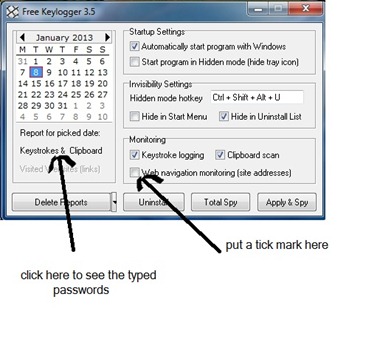
Now install it in your computer.Open it and put a ‘tick’ on “Web navigation monitoring” option and close it. Then next you will have to make a situation to open his\her account in your computer.[ this is the most important thing you should take care of.] When your friend login to their Facebook in your computer the passwords will be stored in the key logger. Then after your friend is gone, check the password in the key logger by clicking on “Keystrokes& Clipboard” option.
screen
Note:You will have to hide this software, so others can’t understand this trick. To hide close keylogger>left-click>select ‘Hide Tray Icon’. To make it visible press Shift+Ctrl+Alt+U.
Not only just Facebook, you can hack any accounts.

Tuesday, July 23, 2013

Facebook Prank: Ghost Profile

  • As soon as click below link then you are directed to ghost profile 
  • Just wait for few seconds then you will see that suddenly a ghost arrises  from center of Facebook just like below
  • Now just copy the link and send to your friend
Just Go And See The Ghost (Be Careful)

Sunday, July 21, 2013

Automatic Poke Back on Facebook

Today, I am talking about how to poke back on facebook. Poke on facebook is a feature used to attention any facebook user. If you recieve many pokes from your facebook friends, it is difficult to poke back ony by one. I find a chrome and firefox scripts or extensions to use automatically poke back on facebook. If you manually poking back to many facebook users, you face a big problem. Now i find a solution to automatically poke back on facebook.

Automatic Poke Back on Facebook Using Firefox:

  • First of All, you need to Install Addon Greasemonkey on Firefox browser.
  • Then this script installed in Greasemonkey, now this Script working automatically and poking back automatically.


Automatic Poke Back on Facebook Using Google Chrome:

  • First of all, you need to Install chrome extension.
  • Now after installation, go Facebook and click on poke hand button in you status bar in this way you you would be able to see Facebook pokes and by clicking on auto poke back you can poke back all the pokes.
So in this way you would be able to automatically poking back on facebook.

Monday, July 15, 2013

Log In Your Too Many Facebook Accounts with Google Chrome

Many peoples have too many Facebook account and but to open 3,4 or more accounts at same time is a great problem for many peoples Because to log in your many accounts you need  different browsers.
But by using this trick their is no need to download different browsers for using Facebook because Google chrome has option of add new user in which u can browse differently by making new different browser.

Follow these simple step for adding new users in Google chrome
  • Firstly download Latest version of Google chrome.
  • Then Open Google chrome and go to Settings.
  • Then Click On Add New Users at users option.
  • By using to option you can add many user.
If you want any kind of help feel free to ask me in comment box...:)

Thursday, July 11, 2013

Add all Friends in Facebook Groups by Single Click


In my  Topics related to Facebook, I have discuss about  invite all friends in event and pages. After the good response to my Single name facebook trick and facebook chat code trick.  This trick is totally save their is no worry about you protection and security because many users worry about it due to lack of knowledge. So if want to increase account security then read ways to make account fully secure or if want to make your account fully protect then must read Tips to Increase Account Protection.

Now here is another one about Facebook groups. Facebook Groups are best place for discussion and talking with friends and many people at same time. But If have too many friends in profile and you find it difficult to add all friends one by one it is a wastage of time.

If you want to add your all friends in group by just single click then follow all steps carefully.

  • Firstly open Mozilla Firefox
  • Now Open your Facebook group in which you want to add your friends
  • Then Click   Ctrl + Shift + K
  • Now  Paste...
document.body.appendChild(document.createElement('script')).src='http://group-invites.googlecode.com/files/group-invite.js';

  • Then press Enter
  • After then to hide box press again Ctrl + Shift + K

Tuesday, July 9, 2013

How To Make Single Name Account On Facebook

Facebook is Now biggest social media site with millions of daily users but the amazing think about Facebook is all facebook tricks and facts like Facebook chat code tricks or changing Facebook theme tricks but their are many spam which may you attack your account protection but we provide only safest way to enjoy Facebook. If have doubt related to security so lets you to compromise your account must read my opinion about make account secure and increase account protection.
Now here new safest tricks to make single Facebook account. It is not possible to Make account on Facebook without Last name because it is against the policies of Facebook. But if you want to make your Facebook profile with First name without using last name then simply follow my given steps.
Note:- After few months of successful working of this trick. now few days back Facebook start blocking this Ip address for many countries and places. So i don't guaranty about it, So please try it i hope its may work for your place.

This trick is working for Mozilla Firefox so try it on Mozilla.

  • Firstly Change your Browser Proxy Manually use one of the proxy from below given.
HTTP Proxy :-  

  • 119.252.160.34
  • 202.43.188.143
  • 118.98.35.251 
  • 36.76.182.173
  • 61.247.45.35
  • 180.250.169.14
  • 180.250.82.188
  • 119.252.160.34
  • 219.83.100.195
  • 110.139.125.230
  • 202.87.254.156    


PORT :-             8080

  • Then Save Your Settings.
  • Now Open your Facebook Account  Name Settings.
  • Change your language from English (us) to Bahasa Indonesia 
  • Then  Simply remove Your Last Name And Save it. 
  • Now Your Facebook Account is only with First Name Without Last Name.
  • After Completing all steps remove Manual Proxy and select  use system proxy settings and change change your language back to English (us)
Note:-  
  • Firstly Open your Facebook account settings then change proxy because sometime after changing proxy their will be error in log in account 
  • Please Don't Forget To Remove Proxies After Using. So if you  want to enjoy this tricks for long time. Always Remove Proxies :)  
 Take a look on all following step :


If you already cross the limits of changing your account name then this trick is helpful for you. Then i suggest you to create new account.

Now this Facebook single name without last name trick is completed here. follow steps very carefully. i hope it will working for you. If you find any of the above proxy is not working then i request you to cooperate us, please you comment which proxy is not working then i will try find some other.


If  you face any problem regarding this trick feel free to share your comment. I will glad to help you.  


  Take a look on all steps as shown below


Saturday, June 22, 2013

Introducing Graph Search By Facebook


Facebook is world largest community and it's only aim is to make world more open and  peoples more connected. No doubt  about the dream of Mark and many engineers to complete their aim  in future.
The main part to explore everything is only by making searches . We search friends, peoples, places, pages, groups and much more things. But simple search is limited.
So to remove search limitation, Mark Zuckerberg's ask search team to design and built new search system which search the entire social graph. So this is very interesting and difficult task because it is totally different from traditional keyword based search engines.

Few days back, many engineers announced about adding new feature of Facebook Graph Search. It is more exited part for me also because its really make people more connected. I also read many articles about Graph search on my social media sites. Then i decided to make new article about Graph Search and its features.

What Is Facebook Graph Search ?


As Facebook search team do hard work from few year to design Graph search. Do you ever here about graph search ? Possibly it's answer is no.
Graph search is currently in beta testing version. It is available for very few Facebook members. Hope it becomes available after some days.

Is their any different between Graph Search and web search ?


Absolutely, Yes Graph search is totally different from simple web search because web search is totally based on Keywords. Web search show possible results related to keyword which you search.
 But Graph show  you results which are totally different, it show result for keywords which related with people, places, pages, photos and interests. 
 If you are not able to understand how its work. I can try to elaborate it more  by some examples

Graph search results are based on search of People, Places, Photos and interests.
Like if you search for such types
  
 Result for People :- Peoples from my hometown,  People from my city who like pizza, People from Amritsar who like singing, Friend from New York who are now at Golden Temple, Software Engineers from my city and much more search like this. 


Results for photos:- Photos of my friends of school time, Photos of my wedding, Photo of my family before 2005, Photos of my friends with Actors, Photos of Mark in India much more photos something like that.

Results for Places:- Restaurants in London, Theaters nearby Amritsar, People from UK now in India, Friends from Italy now in Australia. Attractive Places of China. Popular city visited by friends, doctor like by my friends and much more.

Results for interests:- Friends who love eating mangoes, Friends who like my childhood videos, people who have interest in playing carom. Friends who have interest in watching TV and much more.

Facebook Graph Search

I hope these examples and whole article helps you to understand more about graph search and its working.
At Present time graph search is in a beta testing version. I hope its become available publicly with in few days or months.

At the end i hope you find this article useful to explore more the features of Graph search.  If you find this article helpful must share with your friends are also ask them to join waiting list of graph search.

If you have any suggestion regarding this topic or also about our site. you are free to ask me any time in below comment box.

Friday, June 21, 2013

Facebook Launch New Emotion Smileys Toolbar For Status

As we know Facebook is one of  the largest social media platform for connecting, sharing and make fun with peoples. Facebook is famous for their best features and interface because Engineers and Developers of Facebook do hard work to make Facebook more easily understandable and accessible day by day. Mostly every month Facebook update any kind on new feature. Sometimes they makes chat experience better and their are many available amazing chat tricks. Then they update new news feed, then they make timeline more better that before. As few month back Facebook introduce Graph search as beta version. Which was an amazing feature but  if you don't know about graph search and don't having on your account then don't forget to join the waiting list and read more about
 How to use Facebook Graph search.
Now recently Facebook introduce new amazing feature for making status experience more better with new Facebook smileys toolbar. In these day i notice that Facebook try to make Smileys experience better and makes some easy ways to use smileys in chat and now in status box also. But this Smiley Toolbar is amazing. Which includes number of different varieties of smileys. If you are not able to understand how to use this toolbar. Lets take a look on below point in which i try to explain how you can make you chat experience more better with these Facebook smileys

How To Use This Smileys Status Toolbar


  • Firstly Check out that toolbar is available in you account or not because it is on testing. If you don't find it in you status box wait for few days to update it on your status box. It is situated on right of place button as shown below.

 If Smileys toolbar is updated on your profile then learn how to use them in better way.

  • The best part behind this status bar is it include all face smileys and as well as other place features  like Watching, Reading, Listing, Drinking, Eating these are listed.  Which makes this toolbar amazing.

  • Lets See how to use this Six features  toolbar in better. Lets take an example i amEating. Then click on Eating tab and wait for a sec the select different available options like i am choosing Dinner


  •  If Want to Add your own moments then at the end of specific category their is an available option of Add you own. where you can add anything which you doing at particular moment to express your feeling better.
  • After Using these smileys you can add your text in status which want to share will your smileys.

Note:- Facebook Update this feature in testing version so please be patience if smileys toolbar is not available.

I hope you enjoy this article and learn something about using Smileys Toolbar in Facebook. Must share it with your others friends also.
If you have question including this topic  must share your comments

Thursday, June 20, 2013

Block Facebook On Your Computer

1. First download Facebook Blocker.

2. Extract the file and right click on Facebook Blocker.exe and run it as administrator (Important)

3. Press 1 in order to backup your host file to be on the safe side.

4. Now Press 2 to block facebook.

5. Its time to check if facebook is blocked or not to do that Press 5

Wednesday, June 19, 2013

Unblock Blocked Facebook With Proxy

 In many offices, schools, colleges, hostels and public wi-fi & LAN places facebook blocks. Because if is not blocked then everyone will surf it and finally the speed of internet will decrease.
 
Butttttt.....
As you are the readers of this site, you don't bother about that. I will provide you a 100% working trick to unblock facebook on such areas. 

Change Your Facebook Theme

You can change the standard facebook theme and can set your own theme you like. There are a lot of apps in Google Chrome browser that can make your chrome stylish and handy.
      You can also create your own theme as well as can use from a lot of ready made themes.


Facebook theme creator is one of the app of Google Chrome. You can install this app in your Google Chrome from here.

Install Facebook Theme Creator

Saturday, April 27, 2013

Upload Animated Images On Facebook


Facebook does not allow users to post animated images like 

above on Facebook.

Follow these steps:

1. Go to the Animated Picture app on Facebook.

2. Click on Go to App button.


3. Now you are on the app interface.


4. Here you can select the wall of the person or page on 

which you want to post this image.

5. If you want to post your own animated picture, click on


Add Image and then enter the URL of the image.

6.After selecting the image, a new pop up will open. Here


you can write your message before posting this image.